

Microsoft is making Microsoft 365 Backup even more practical for real-world recovery scenarios by introducing granular restore capabilities for SharePoint and OneDrive. Instead of having to restore an entire site or account just to recover a few missing or corrupted items, admins will now be able to browse restore points, search for content, and recover individual files or folders. This is a really useful improvement for organisations that want a faster and more targeted way to respond to accidental deletion, corruption, or other recovery events.
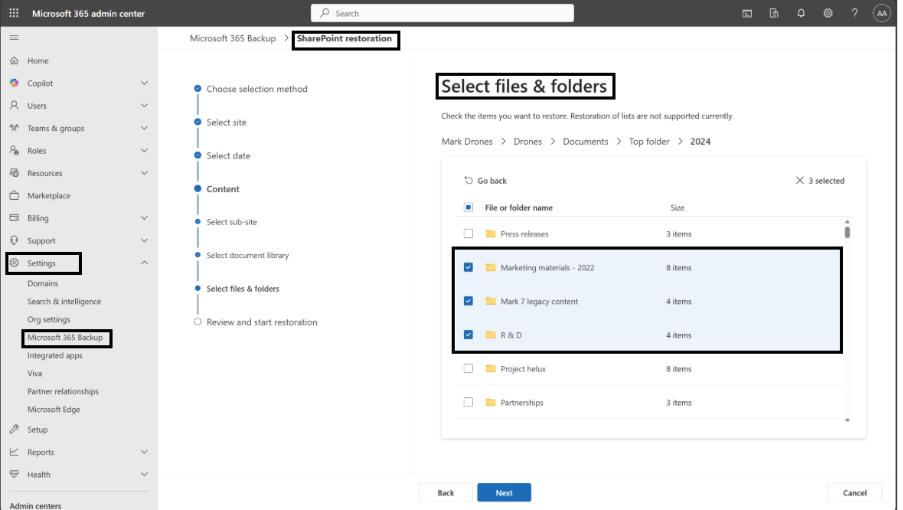
Up until now, restoring backed-up data in many cases meant rolling back a full SharePoint site or a full OneDrive account. That worked, but it could also be more disruptive than necessary when the issue only involved a small amount of content. With this new update, Microsoft is giving admins much more control over the recovery process by letting them focus only on the files or folders that actually need to be restored.
Another helpful part of this update is the restore flexibility. Admins will be able to restore content back to its original location, replacing what is already there, or restore it to a new location as a copy. According to Microsoft Learn, Microsoft 365 Backup also supports both standard restore and express restore options, depending on the scenario. This gives IT teams more choice in how they handle recovery based on urgency and business impact.
From a business point of view, this matters because it can help reduce downtime and avoid unnecessary disruption. If only one folder or a few files are affected, there is no need to restore an entire workload and potentially impact more users or more content than necessary. By restoring only what is needed, organisations can respond faster and keep operations running more smoothly. Microsoft has positioned this feature as a way to lower recovery time and reduce operational impact while still respecting existing backup policies and restore points.
This feature applies to Microsoft 365 tenants that already have Microsoft 365 Backup enabled, and it is especially relevant for admins responsible for SharePoint Online and OneDrive for Business data protection and recovery. Microsoft has also made it clear that only admins with the SharePoint Backup Administrator role will be able to perform these granular restore actions for SharePoint sites and OneDrive accounts. There is no direct impact on end users, as restore operations will continue to be initiated by admins behind the scenes.
In terms of timing, Microsoft says the feature will start rolling out in Public Preview worldwide in early March 2026, with completion expected by mid-March 2026. General Availability worldwide is then expected to begin in late April 2026 and finish by early May 2026. Microsoft Learn also notes that granular restore is currently available in preview for protected SharePoint sites and OneDrive accounts.
For organisations preparing for this change, Microsoft says no special action is required to receive the feature. Still, this is a good time to review your current Microsoft 365 Backup coverage for SharePoint and OneDrive and make sure critical workloads are protected. It would also be worth helping backup administrators get familiar with the new selected-content restore experience and updating internal recovery procedures or runbooks to include file- and folder-level restore scenarios.
Overall, this is a strong update for Microsoft 365 Backup. It adds a more practical and precise recovery experience, gives admins greater flexibility, and helps organisations restore data in a way that is faster and less disruptive. For businesses already using Microsoft 365 Backup, this new capability should make recovery workflows much more efficient, especially when only a small portion of content needs to be recovered.
Click here to learn more!
Got questions, or need help, contact the Dicker Data Microsoft team for more information.

Microsoft Momentum October 2026 Edition - AI Innovation, Marketplace Growth and New Opportunities Ahead

The New Copilot: Your Opportunity As A Partner

Microsoft Momentum July Update: FY27 Indirect Reseller Changes

Copilot Chat: A Safe, Practical First Step into AI for ANZ Businesses