
Adobe Audition. A professional audio workstation.

Dicker Data empowers you and your customers to create, mix and design sound effects with Adobe Audition, the industry’s best digital audio editing software. 

Audition Logo   Audition

Make your photos yours.

Stay in the moment with generative AI in Lightroom knowing you can create photos that look exactly the way you want. Remove anything in a click with the new Generative Remove, without leaving a trace.
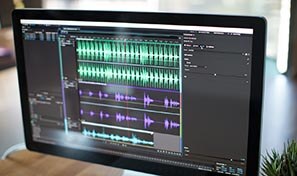
Computer monitor displaying an audio editing interface with multiple sound wave tracks arranged on a timeline.

Add oomph to your audio.

Use the Essential Sound panel to achieve professional-quality audio — even if you’re not a professional.

Neon pink and green spiral rings floating over a dark background with faint digital interface lines and symbols.

Repair and restore.

Get best practices for fixing audio, including how to use the spectral frequency display, Diagnostics panel, effects and more.
Adobe Creative Cloud app icons, including Premiere Pro, After Effects, Photoshop, and Illustrator, over an audio mixing console.

Everything you need. Right where you need it.

Along with tools for colour, audio and graphics, Premiere Pro works seamlessly with other apps and services, including After Effects, Adobe Audition and Adobe Stock. Open a Motion Graphics template from After Effects or download one from Adobe Stock and customise it — all without leaving the app. And Premiere Pro integrates with hundreds of partner technologies. 

Key features

Multichannel audio workflows

Automatically separate all audio channels to unique clips. You can customize the channels assigned to a clip and adjust Specific Channel Routing. 

DeReverb & DeNoise effects

Reduce or remove reverb and background noise from recordings without noise prints or complicated parameters with these efficient real-time effects or through the Essential Sound panel. 

Sound Remover

Easily remove specific audio elements in just a few clicks. Select a sample of the unwanted sound - Sound Remover will scan the entire clip and remove that element from the recording. Repair or restore dialogue and production audio to deliver pristine results faster. 

Automatic speech alignment
Replace location dialogue with studio-recorded ADR and align it perfectly, even if the original audio includes background noise. Fix lip sync issues easily and deliver better production value faster. 
Preview Editor
Confirm your edits before you commit. With Preview Editor, you can visually compare waveform tweaks, view multiple file sections simultaneously, and confirm time stretching before applying your changes. 
On-clip gain control and waveform scaling
Adjust your audio without moving your eyes or cursor away from your content with on-clip gain adjustments. Use your eyes and ears to match clip loudness to neighbouring clips with a waveform that smoothly scales in real-time to amplitude adjustments. 

Get started with Adobe and Dicker Data

Please fill in your details below and a member of our team will be in touch shortly: