
Dicker Data

Your Expert Guide Through Cisco Enterprise Agreements

A Cisco Enterprise Agreement (EA) is a 3–5 year licensing agreement that allows customers to bundle multiple Cisco technologies under one simplified contract.
Designed to scale as customers grow, Cisco EA provides greater flexibility, visibility, and commercial value, without the usual complexity.
Flexibility
Visibility
Better Value
Why Cisco Enterprise Agreements?

Bigger Deals & Greater Cisco Portfolio Access
Cisco EA enables partners to position broader Cisco solutions under a single agreement, creating larger deal opportunities and simplified expansion conversations.

Become the Customer’s Trusted EA Partner
Being attached to a customer’s EA strengthens long-term relationships and creates ongoing opportunities for future expansion and renewals.

Drive Partner Profitability
EA creates opportunities to attach professional services, managed services, and recurring revenue streams on top of the agreement.

Simplified Cross-Sell Opportunities
With one agreement and one renewal cycle, partners can more easily introduce additional Cisco architectures and services over time.
At-a-Glance Benefits
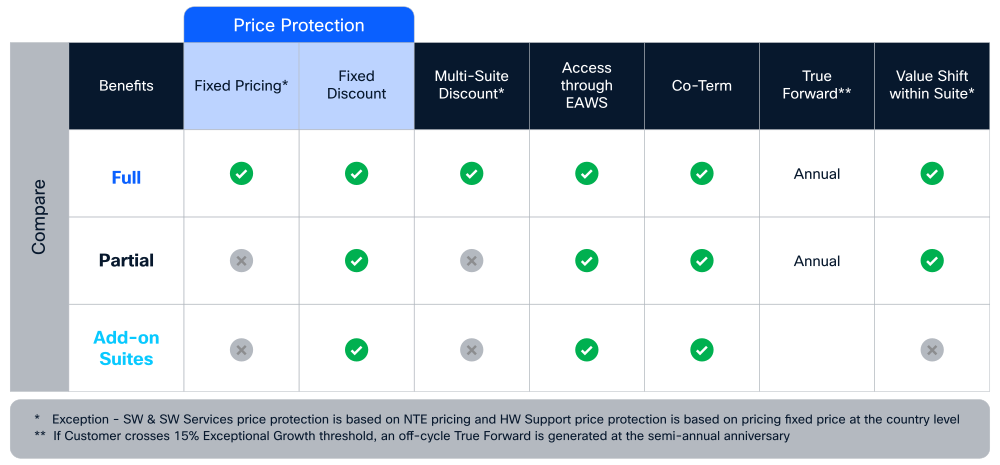
*A key difference between a Full Commit and a Partial Commit is pricing predictability. Full Commit pricing fixes both the list price and the discount off list for the duration of the contract. Partial Commit does not fix the list price for the duration of the term or offer discounts for additional suites.
Cisco Disti-Enabled EA Onboarding Process
The Cisco Disti-Enabled Enterprise Agreement Program allows partners to transact and manage Cisco Enterprise Agreements through Dicker Data, simplifying procurement, billing, and operational support.
This model delivers:
Step-by-Step Process Flow
Step 1
Two team members must complete the online BMCC course:
Training link: (as provided in your current process)
- Each individual must take a screenshot of the Score Report page when finished.
- Approx. completion time: 1 hour
Optional support:
If your team needs help preparing for or passing the BMCC exam, book a session with your Dicker Data BDM or Programs Manager.
Use the Cisco exam link provided to take the BMCC assessment.
Each participant must retain a screenshot of their Score Report.
Your Cisco PPE Administrator must:
- Log in to the PPE - Partner Program Enrollment portal
- Upload the two Score Report screenshots
- Finalise the BMCC certification enrolment
Step 2
Once BMCC is completed:
- Contact your Dicker Data BDM (or Cisco Programs Manager).
- Request nomination into the Cisco Disti‑Enabled EA Program.
- Dicker Data will submit the nomination form on your behalf.
- Cisco’s global program team reviews submissions within 48–72 hours.
- Dicker Data will notify you once approval is granted.
Step 3
- After your nomination is approved.
- Your PSS Administrator must sign in to the PPE - Partner Program Enrollment portal.
- Enrol your organisation into the EA 3 Distribution Designation.
- This completes your activation and allows your organisation to transact Cisco EAs via Dicker Data.
Next steps: Let your Dicker Data BDM know that you have finalised your EA enrolment via Dicker Data. EA quoting will become available in CCW within 24 hours.
Managing Your First EA Opportunity
Have your customer sign the Letter of Customer Consent (LoCC). This can be done via a Blank PDF or can be digitally initiated by Dicker Data in the EA Management Portal (EAMP).
Return signed LoCC, Dicker EA team will upload the file to the EAMP tool to unlock the customer Cisco Install Base Report.
Dicker Data EA team will create a DID, build an EA quote, and submit to Cisco AM for approval.
Cisco AM approves the DID, Dicker Data EA team converts EA quote to a Dicker Data quote and proposal. You will be sent a Dicker Data quote, a link to the EA T&Cs, and a rate card.
EA Deal Registration
Deal Registration is available for EA renewals, or for A La Carte (ALC) to EA conversion opportunities. This process falls under the Teaming for Renewals eligibility criteria.
- Adoption Accountability Plan (DLSE)
- Customer Assessment
- Mutual Activity Questionnaire
- LCI Adopt
Rate Card & Terms
On February 17, 2025, Cisco updated the Enterprise Agreement Program Terms for all partners, i.e. distributor, 1Tier or 2Tier reseller, (“EA Program Terms”) to:
- Align partner terms across all buying programs (“BP”) (i.e., EA 3.0 Partner Program Terms, EA 3.0 Distributor Program Terms, Collab Flex Program Terms and MSEA End User and Provider Entitled Program Terms) to ease review and minimize negotiations;
- Simplify all BP partner program terms to avoid duplicative content already existing in the reseller agreements, EA 3.0 and Collab Flex EA end user program terms (“EA End User Terms”) and/or in EA Program collateral documentation; and
- Update EA Program Terms and EA End User Terms to reflect that, starting February 17, 2025, Cisco will no longer require documented customer acceptance of the EA end user program terms.
Please note, the program changes reflected in the updated EA Program Terms apply to all new EA 3.0 and Collab Flex deals booked by a partner on or after February 17, 2025.
FAQs
No. Each portfolio can have its own term and billing cycle, even though everything sits under one EA contract.
Cisco EAs cover five main portfolios:
- Networking Infrastructure
- Applications Infrastructure
- Collaboration
- Provider Connectivity / Security
- Services
A portfolio is simply a group of related technologies packaged together to solve a business need.
Customers can start with one portfolio and add others later.
No — EAs cover full legal entities, not individual departments.
However, customers can exclude entire legal entities if needed.
Cisco EA stands out because of:
- A 15% growth allowance (for Collaboration and Security portfolios)
- The True Forward process (transparent, no surprise penalties)
- Ability to mix portfolios across architectures
Customers can increase usage (users/SaaS/licences) by up to 15% within certain portfolios at no extra cost during the EA term.
- Applies to: Collaboration & Security
- Doesn’t apply to: device‑based portfolios
It can be used anywhere within the portfolios purchased, as long as it follows the offer rules.
Again, not applicable to device‑level portfolios.
True Forward is Cisco’s way of handling legitimate over‑consumption.
If a customer uses more than their entitlement:
- Cisco reviews it at the next EA anniversary
- Any added usage is billed for the rest of the EA term
No back‑billing. No penalties. Just forward‑looking adjustment.
There’s no charge for the final‑year overage. But:
- If the customer renews, the new EA starts with the updated usage level
- If they don’t renew, they must buy licences to cover the growth since the last True Forward
Once a customer meets the $100k TCV minimum and fully commits to a qualifying suite, they can easily add Security or Services without needing full‑coverage commitments in those areas.
No — EAs don’t allow scaling down.
They’re designed for predictable growth, not reduction.
EA Workspace is the central dashboard customers use to manage their EA.
In EA Workspace they can:
- View and manage licences
- Provision software (no PAKs needed)
- Control access via Smart Accounts
They must have a Cisco Smart Account first.
Once that’s set up:
- Log in at software.cisco.com
- Go to the Licensing section
- Choose Enterprise Agreements
- Select the correct Smart Account
This will show all EA entitlements and portfolios.
Cisco’s official EA info hub: cisco.com/go/ea
Minimum requirement is $100k TCV.
Most suites have a $50k minimum, with a few exceptions depending on the portfolio.
When a customer orders hardware and links their Smart Account in CCW:
- Cisco recognises the EA
- Software attached to that hardware is automatically discounted 100%
- Devices ship with the correct software preinstalled
They contact the Cisco Customer Interaction Network (CIN) using their EA’s master contract number.
Any included product family is fully entitled under their EA.
EA / PXP Videos
Need Help With Cisco EA?
Connect with the Dicker Data Cisco EA team for onboarding support, quoting assistance, training, and EA opportunity guidance.
By placing an order for the items in this quote, you confirm that your End User has agreed to be legally bound by Cisco's EA End User Program Terms, where are located at Cisco Customer Contract Experience Center. Partners are accountable to pass through EA End User documentation and obtain Customer Acceptance via own process prior to submitting an EA order.